Welcome to SmartSuite Library
We’re so pleased to have you joining us. Our team is looking forward to helping you move from Infinity to SmartSuite Library and making the transition as smooth as possible.
As part of your onboarding journey, we’ll need a backup of your current Infinity data. This helps our conversion team prepare your library information carefully and accurately before it is brought into SmartSuite Library.
What we need from you
To begin the conversion, please provide a Full SQL Backup of your Infinity database.
Preparing your backup
Once you have the backup file:
- Locate the backup folder.
- Right-click the folder.
- Select Send To.
Choose Compressed (zipped) Folder.
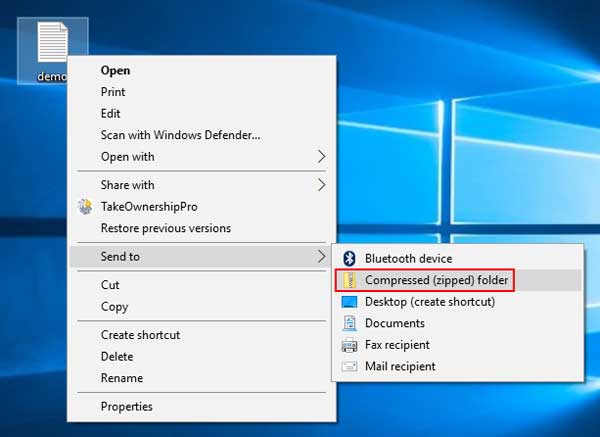
This will create a zipped copy of your backup that is ready to upload.
Uploading your file
Please upload the zipped folder using the secure upload link provided in your onboarding email.
We’re here to help
If you’re unsure whether you have the correct file, or need help preparing your backup, please contact our team via email at support@functionalsolutions.com.au
We’re happy to assist and make sure everything is ready for a smooth conversion.